What Managed IT Support Looks Like for a Business With Multiple Buildings or Campuses
Managing technology across a single office is already a full-time job. Add a second building, a third location, or a campus spread across several acres, and the complexity multiplies fast. For businesses navigating that reality, managed IT support is not just a convenience. It is often the difference between a technology environment that holds everything together and one that quietly falls apart.
This post walks through what managed IT support actually looks like when it is applied to a multi-building or multi-campus environment, what problems it solves, and what to look for when evaluating a provider.
Why Multi-Location Businesses Face Unique IT Challenges
A business with one location has one network, one set of users, and one physical space to secure and maintain. A business with multiple buildings has multiple everything. Multiple networks. Multiple sets of users with different needs. Multiple entry points for security threats. Multiple places where things can break down at the same time.
Some of the most common challenges that come up in these environments include:
Inconsistent network performance across locations. What works well in the main office may not translate to a satellite building, an older facility, or a space that was added during a renovation. Network infrastructure that was designed for one footprint rarely scales smoothly without intentional planning.
Fragmented security coverage. If each building manages its own security settings, patching schedules, and access controls independently, you end up with a patchwork of policies that are hard to monitor and even harder to enforce. Gaps form in places no one is watching closely.
No centralized visibility. One of the most frustrating things for operations leaders at multi-site businesses is not knowing what is happening across their technology environment at any given moment. When something breaks, the first question is always, “Is this just our building, or is it everywhere?”
Staffing and knowledge gaps. Smaller buildings or secondary campuses often do not have a dedicated IT contact on-site. The person who ends up troubleshooting is usually whoever knows the most about computers, which could be the controller, the office manager, or someone who simply drew the short straw.
What Managed IT Support Is Actually Doing in These Environments
When a managed IT provider takes over or joins the team at a multi-building business, the work looks different than it does at a single-site company. Here is what a structured engagement typically covers.
Unified Network Monitoring
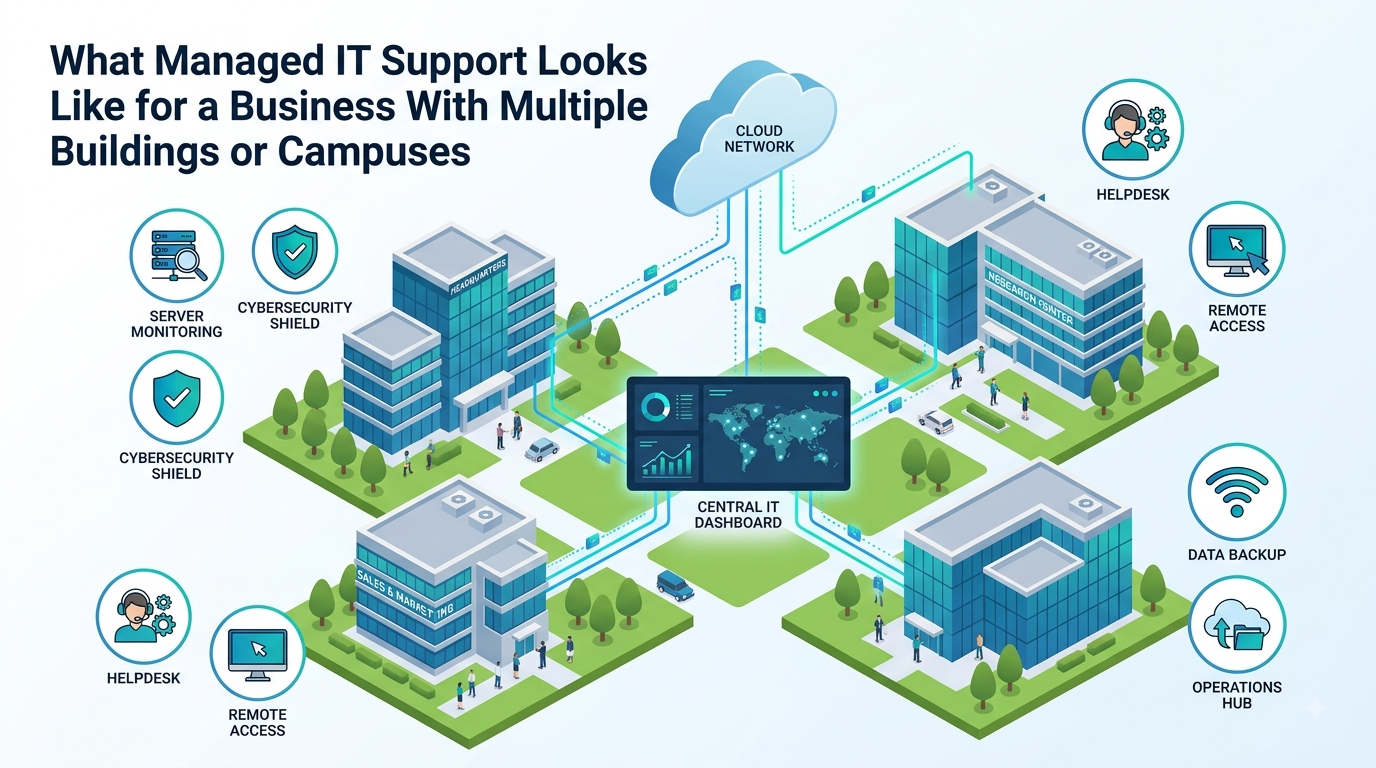
A good managed IT provider monitors all locations under one roof, so to speak. Instead of each building running independently, every network, device, and endpoint gets added to a centralized monitoring system. This means the provider sees problems as they develop, often before users notice anything wrong.
Proactive monitoring catches things like a failing network switch, a server running low on disk space, or unusual login activity at an off-hours access point. In a multi-building environment, that kind of early visibility is hard to achieve without dedicated tooling and someone actively watching it.
Standardized Security Across Every Location
Security is one area where consistency matters enormously. If your main campus has modern firewalls, endpoint protection, and enforced multi-factor authentication, but a secondary facility is running on outdated hardware and shared passwords, your overall security posture is only as strong as the weakest building.
Managed IT support addresses this by standardizing security policies across every location. That includes patching and update schedules, access controls, firewall configurations, and backup systems. When every site follows the same baseline, audits are easier, compliance is more manageable, and there are far fewer surprises.
On-Site and Remote Support Across All Locations
Users at a secondary building should not feel like second-class citizens compared to people working out of headquarters. A managed IT partner provides helpdesk support for every location, usually starting with remote resolution since most issues can be handled without someone physically being there.
That said, having a partner who can dispatch a technician to any building when something needs hands-on attention matters. The worst time to discover your IT provider only covers one campus is when a server room in your satellite office goes down on a busy Tuesday morning.
Equipment and Lifecycle Management
Multi-building businesses tend to accumulate a wide variety of hardware over time. Some of it is new. Some of it was purchased years ago and has not been evaluated since. A managed IT provider tracks all of it, including warranties, replacement timelines, and which devices are approaching end of life.
This kind of lifecycle management prevents the all-too-common situation where a critical piece of equipment fails unexpectedly because no one realized it was seven years old and past due for replacement. With a managed partner, hardware planning becomes part of the annual budget conversation instead of an emergency expense.
Centralized Documentation
One of the most underrated benefits of managed IT support for multi-location businesses is documentation. When every building’s network layout, hardware inventory, software licenses, and vendor contacts are organized in one place, troubleshooting gets faster, onboarding new staff gets easier, and transitions go more smoothly.
Without that documentation, you are relying on whoever set up the network three years ago to still be employed and to still remember what they did.
Industry-Specific Considerations
The multi-campus challenge shows up differently depending on the type of business.
Manufacturing facilities often have both office environments and production floor systems operating on the same network. Keeping those environments segmented, secure, and running without interruption requires a provider who understands that operational technology and traditional IT have different risk tolerances.
Golf and country clubs are a strong example of a campus-style environment with real technology complexity. A typical club might include a main clubhouse, a pro shop, a fitness center, dining facilities, and maintenance buildings, all needing consistent connectivity, secure point-of-sale systems, and reliable member-facing technology. When a tournament is underway or a wedding is in progress, there is no acceptable window for a network failure.
Construction companies with multiple job sites face the added challenge of temporary locations that still need secure access to company systems, cloud applications, and communication tools.
In each of these cases, the right managed IT partner adjusts the support model to fit the operational reality rather than applying a one-size-fits-all approach.
What to Look for When Evaluating a Provider
If your business operates across multiple buildings and you are considering managed IT support, these are the questions worth asking before you sign anything.
Can you monitor and manage all of our locations under one agreement? Some providers specialize in single-site businesses and cobble together multi-site coverage as an afterthought. You want a provider who handles this regularly and has a clear process for it.
How do you handle on-site support at secondary locations? Response time at your main office means nothing if your other buildings have to wait twice as long.
What does your documentation and reporting process look like? A good provider should be able to show you the health of your entire environment at any time, not just give you a status update when something breaks.
How do you handle security standardization across multiple locations? Push for specifics here. Vague answers about security are a warning sign.
What does your onboarding process look like for a multi-site client? Getting everything documented, connected, and monitored properly at the start of a relationship is the foundation for everything that comes after. A provider without a clear onboarding process for complex environments will likely struggle once the work gets underway.
The Bigger Picture
Multi-building businesses carry a heavier technology burden than most people realize until something goes wrong. Managed IT support done right does not just react to problems. It creates a stable, documented, and consistently protected environment across every location so that the people running the business can focus on their actual work.
The goal is not to have the best IT in one building. The goal is to have reliable, secure technology everywhere your team operates.