
How Do You Choose a VPS With the Best Value for Money?
Choosing a virtual private server can feel like working through a maze of specifications, promotional rates and technical jargon. The cheapest plan rarely delivers the strongest return on your money, and the most expensive option, despite its hefty price tag, does not automatically guarantee superior results either.
Real value, as it turns out, sits somewhere in between those two extremes, in that particular middle ground where the server resources you actually pay for each month genuinely match what your specific projects truly demand, no more and no less than necessary.
For British developers, small agencies and growing online shops, finding the right balance between cost and capability matters greatly, because it directly shapes both their monthly budgets and the daily reliability they depend upon. This guide covers the practical factors separating a real bargain from a plan that quietly drains your wallet, helping you weigh numbers against measurable performance before committing.
Decoding the True Cost Behind Every VPS Price Tag
Headline prices certainly grab attention when you first browse available plans, but they tell only part of the story, leaving out the costs that eventually matter most. A plan advertised at just a few pounds per month frequently reflects a temporary introductory rate that, once the first billing cycle has ended, tends to climb quite sharply thereafter. Reading the renewal terms carefully reveals what you will genuinely spend across a full year of service.
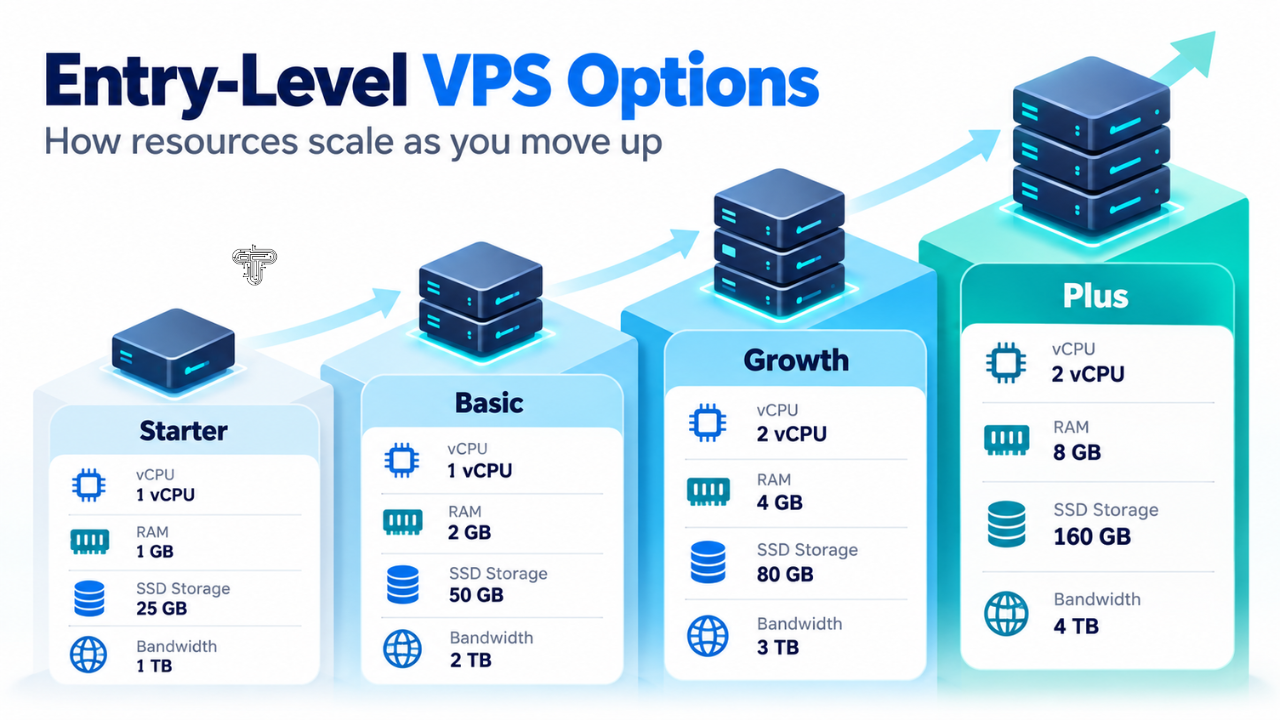
When comparing tiers, look at how providers structure their CPU cores, memory and storage. Transparent pricing lets you match each component to your workload rather than guessing. A clear breakdown of entry-level VPS options, for instance, shows exactly how resource allocation scales as you move up the ladder, which makes side-by-side comparison far simpler.
Introductory Rates Versus Long-Term Commitments
Short promotional pricing works well when you are merely testing a service, but it can mislead anyone who is planning for the long haul over several years ahead. Calculate the total cost spread across a period of 24 or 36 months, and then carefully compare that resulting figure across all the candidates you happen to be considering. A plan that initially appears to be more expensive at first glance, when you consider only its opening sticker price, sometimes turns out to be considerably cheaper in the end, particularly once the renewal rates settle down and the true recurring costs become clear.
Mapping Your Workload Before Comparing Hosting Plans
Every project places different demands on a server, so no two match exactly. A personal blog barely uses resources, while a busy e-commerce platform managing payments and inventory demands far more capacity. Before you even look at pricing tables, note what you actually run and how traffic shifts across the week.
When you are in the process of sizing your requirements, it is worthwhile to take some time to carefully reflect upon and work through the following set of questions, each of which can help guide your thinking toward a more accurate assessment:
- How many concurrent visitors do you expect during peak times?
- Does your application rely heavily on database queries or background processing?
- Will you need custom software or specific operating systems installed?
- How much monthly storage do your content, backups, and logs use?
- Do you expect rapid growth requiring quick scaling?
Answering these honestly prevents overpaying for capacity you never touch. Many teams managing mobile tools and connected services benefit from reviewing how different setups perform, and our coverage of the latest app-focused reviews and guides offers useful context on resource-hungry software.
Matching Resources to Realistic Demand
Add roughly twenty per cent buffer for traffic spikes. Allocating resources far beyond that reasonable threshold simply wastes money that could instead fund other important priorities, which deserve attention and investment across your broader operations.
Spotting Hidden Fees That Quietly Inflate Your Monthly Bill
The advertised price rarely reflects what you will actually end up paying in the end. Many extras attach to a plan, adding up quickly. Reading the fine print prevents real frustration later.
Keep a close eye on charges connected to backups, additional IP addresses, bandwidth overages and managed support, since these extra fees can quietly accumulate and inflate your final bill. Some providers include these features generously, while others charge separately for each one as a paid extra. A plan that appears affordable can end up costing considerably more once you tack on the components your setup actually requires.
Questions That Reveal the Real Price
Ask the provider whether automated backups are already included within the base package or whether they are billed separately as an additional charge that appears later on your invoice. Verify whether bandwidth is truly unmetered or capped with penalties past a limit. Confirm whether a control panel licence carries its own fee. These small line items shape the genuine value equation more than the advertised number ever does, and clarity here protects your budget across the whole contract.
Measuring Real Value Through Uptime Guarantees and Support Quality
Price counts for little if your server keeps going offline and dropping out repeatedly. Reliability underpins value, and a provider offering 99.9 per cent uptime allows about nine hours of yearly downtime, whereas 99.99 per cent cuts that sharply. For sites that generate revenue, those extra decimal points translate directly into protected income.
Support quality deserves equal weight. A responsive team that answers within minutes during an outage is worth paying a premium for, particularly if your own technical knowledge is limited. Independent testing offers helpful perspective here, and a detailed roundup of leading VPS hosts measured against real benchmarks can confirm whether a provider’s claims hold up under scrutiny.
Reading Service Level Agreements Carefully
Uptime promises carry weight only when backed by compensation clauses. Check what credit you receive if the guarantee is missed, and note whether scheduled maintenance counts against the figure. Vague wording often signals weaker commitment. The same scrutiny applies when assessing subscription-based digital services generally, something we explored in our breakdown of how to evaluate streaming options in our guide to choosing the right IPTV service in 2026, where reliability and support proved just as decisive as headline pricing.
Making Your Final Choice With a Simple Price-Performance Scorecard
Once you have carefully gathered all the relevant details, a well-structured scorecard turns your scattered impressions and vague feelings into a clear, confident decision that you can justify later. Score each candidate on the factors you care about, then weight those scores by priority. A startup might prize scalability most, whereas a hobbyist chiefly wants the lowest rate they can maintain.
When evaluating your options, you should carefully assess and assign a score to each individual provider based on the following distinct dimensions, which are outlined in detail below:
- Transparent pricing with clear renewal terms
- Resource allocation tailored to your measured workload
- No surprise fees for essential features
- Documented uptime history and compensation policy
- Accessible, knowledgeable technical support
When you are comparing the various shortlisted candidates against one another, the name IONOS, which carries a certain reputation of its own, tends to surface repeatedly alongside several other options that are genuinely worth examining closely during this particular stage of your decision-making process. Adding up the weighted scores usually reveals the strongest overall package, even when no single plan wins every category.
Tech Blaster
Trusting Your Numbers Over the Marketing
Although polished promotional language can easily sway your judgement, your scorecard, which you have built carefully over time, reflects genuine evidence and measured facts rather than mere persuasion or clever marketing. The best value emerges when verified performance, honest pricing and dependable support all come together within a budget that you can comfortably maintain month after month without strain. Review the assessment roughly once a year, since both your needs and the market change oveVPSr time. A plan that suited you perfectly last season may no longer deliver the strongest return, so reviewing it carefully keeps your spending aligned with genuine need rather than mere habit.